
Buyers & Co-Buyers on a Sale
A single buyer, a couple buying together, a guarantor standing behind the purchase — REDA records everyone involved in a sale using Contact Roles. This article shows how to add and edit those roles, explains how conversion sets up the first buyer for you, and covers the one thing that surprises people: how REDA decides which contact is the deal's primary, and why you should keep just one marked primary. No prior REDA experience is assumed.
Access you'll need. Adding and editing Contact Roles requires the REDA - Property Sales User permission set (create and edit on the deal and its Contact Roles). You also need access to Contacts, which your administrator grants separately — it isn't part of the REDA permission sets.
What a Contact Role is
A Contact Role is the link between a person — a Contact — and a sale deal, tagged with what that person is to the deal. Each Contact Role carries a Role (Buyer, Guarantor, and so on) and an Is Primary checkbox that flags the main contact. It's how REDA answers "who is on this deal, and in what capacity?"
The Role is chosen from a fixed list with no default. The full set of values is Lessee, Seller, Occupant, Guarantor, PM Client, Buyer, Lender, Ex - Lessee, Ex - Occupant, and Ex - Guarantor. On a sale, you'll use Buyer for the buyer and any co-buyers, and Guarantor for anyone guaranteeing the purchase. The rest belong to leasing, property-management, and lending flows.
The buyer role at conversion
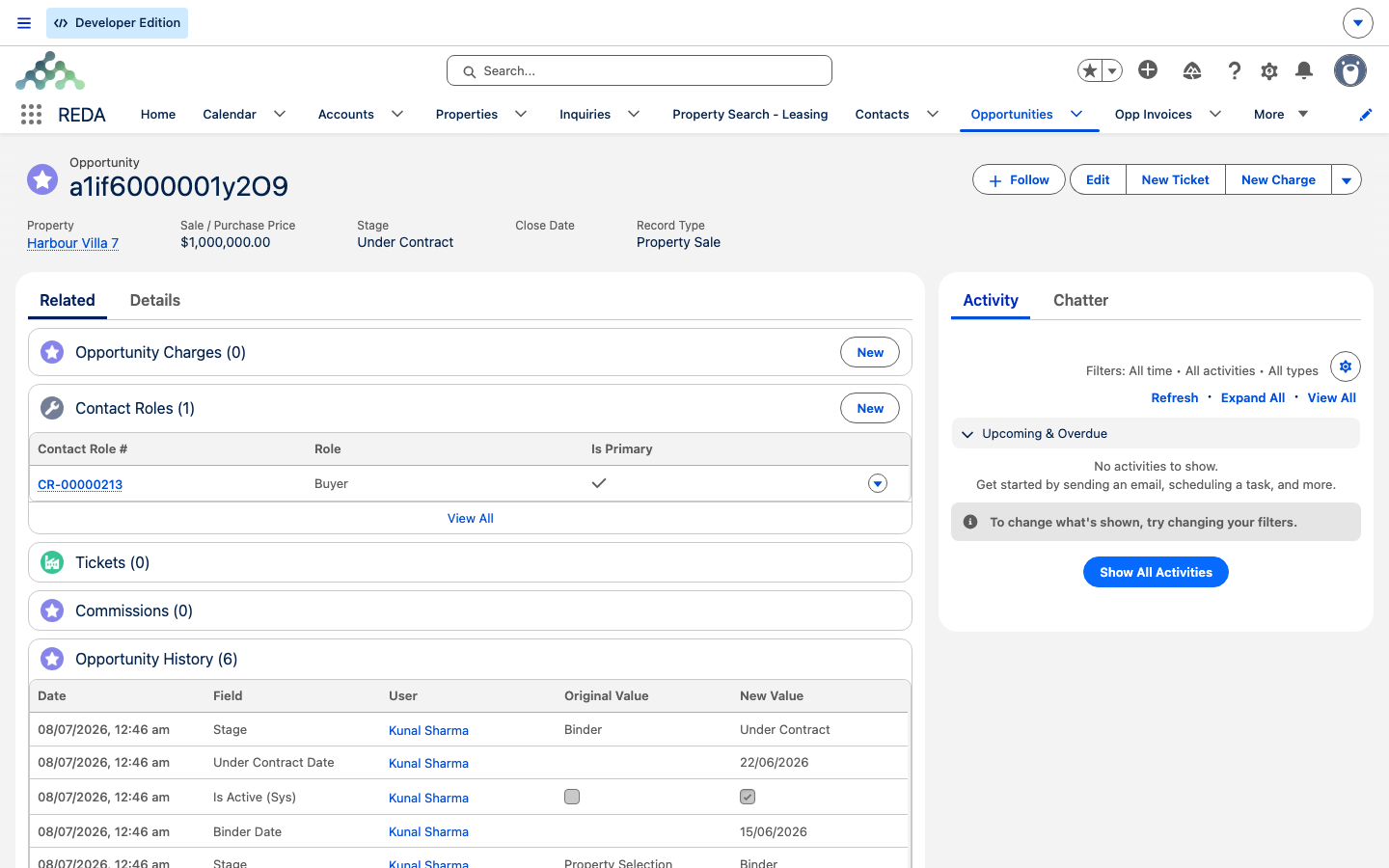
You usually don't create the first buyer role by hand. When you convert a buyer inquiry, REDA creates the first Contact Role for you — marked Primary, with its Role defaulted to Buyer. For a straightforward single-buyer sale, that's all you need; the buyer is already recorded and set as the deal's primary contact.
The Buyer default only fills in when the role is left blank at the moment the record is created. If a role was set explicitly, REDA keeps it as entered.
Adding co-buyers and other parties
To bring more people onto the deal — a co-buyer, a guarantor — use the Add Contact action on the deal:
How the primary contact works
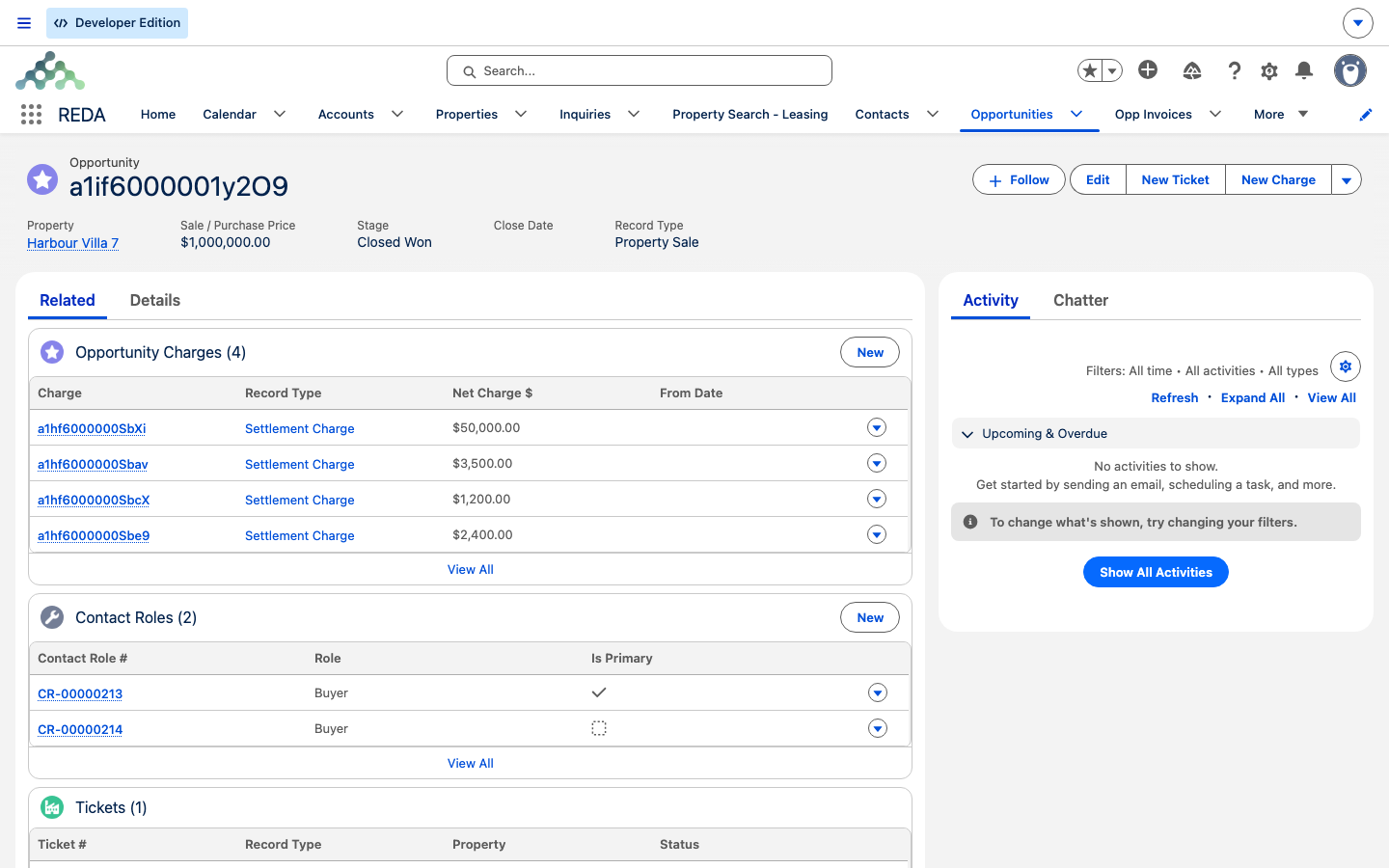
The deal has a single Primary Contact, and REDA derives it from the Contact Roles. Whenever a primary role is added, changed, or removed, REDA re-derives the deal's Primary Contact to the contact of the first Contact Role where Is Primary is checked, and cascades that primary contact down to any child deals.
Worked example: David and a co-buyer on Harbour Villa 7
Meridian Properties is selling Harbour Villa 7 to David Okafor. When David's inquiry was converted, REDA created his Contact Role as Buyer, marked Primary — so the deal's Primary Contact is David, with nothing to set up.
David is buying with a partner. The agent clicks Add Contact, picks the partner's Contact, sets Role = Buyer, and leaves Primary unchecked. David stays the deal's Primary Contact. Had both been marked primary, REDA wouldn't have stopped it — the deal's Primary Contact would just be whichever it read first — so the agent keeps only David primary.
Reference: roles and primary behavior
The roles you'll use on a sale:
| Role | Use it for |
|---|---|
| Buyer | The buyer and any co-buyers |
| Guarantor | A guarantor on the purchase |
| Seller | The selling party, for context — the buyer side is the sale's focus |
| Others (Lessee, Occupant, PM Client, Lender, Ex - …) | Not typical on a sale — they belong to leasing, property-management, and lending flows |
How conversion and the primary contact behave:
| Behavior | What REDA does |
|---|---|
| First contact role on conversion | Created as Primary, Role defaulted to Buyer |
| Role default | Applied only when Role is left blank when the record is created |
| The deal's Primary Contact | The contact of the first Is Primary role; cascades to child deals |
| Multiple primaries | Not blocked — keep exactly one Primary yourself |
Where to go next
- Selling a Property — run the deal these buyers are on through its stages.
- Working Buyer Leads — where the first buyer comes from, at conversion.
- Closing a Sale (Closed Won) — at close, the buyer's account becomes the property's owner.
Frequently asked questions
Use Add Contact on the deal, pick the Contact, and set Role = Buyer. Leave Primary unchecked unless they should be the deal's primary contact.
The deal's Primary Contact is the contact of the first Contact Role marked Primary. Conversion marks the first buyer primary automatically, so unless you change it, that's your buyer.
In practice, yes. REDA doesn't block it and won't uncheck the other one, so it reads the first primary it finds and the result can look arbitrary. Keep exactly one Contact Role marked Primary.
On inquiry conversion, the first contact role is defaulted to Buyer and marked Primary. The default only applies when the role is left blank as the record is created.
In this OEM edition, no — it's REDA's own Contact Role. The ISV edition uses the standard Salesforce Opportunity Contact Role for the same job; the workflow is equivalent.
Was this article helpful?