
Posting & Unposting Reconciliations
Your reconciliation batch is calculated — now you bill the tenants. Posting turns the calculated shortfalls into real invoices and freezes the numbers behind them, so what the tenant receives and what the batch says can never drift apart. This article shows you how to post a batch, exactly which invoices it creates, what locks once you've posted (the full lock matrix, with the messages you'll see if you try to edit anyway), and how to unpost — which deletes the invoices it created. If you need the numbers explained, read Expense Reconciliation: Concepts first; to build and calculate the batch, see Running a Reconciliation Batch.
Access you'll need. Posting and unposting require the REDA - Expense Reconciliation Admin permission set. The REDA - Expense Reconciliation Read Only set can view a posted batch but not change it.
What posting means
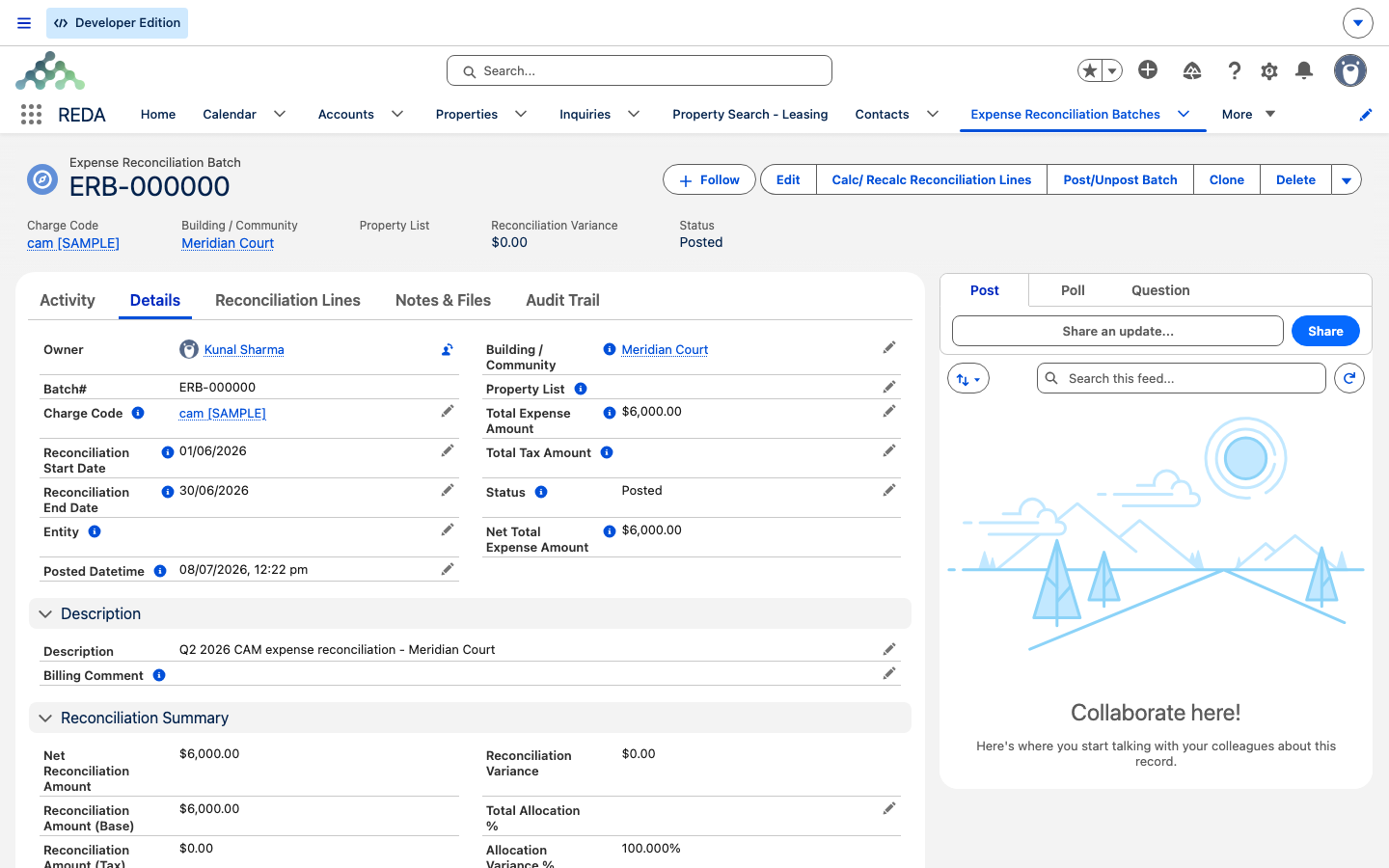
Posting is the commitment step. Up to this point the batch is a calculation — a set of lines that say what each tenant owes. Posting acts on the whole batch at once and does two things:
There is no per-line posting — you post or unpost the batch as a whole.
The invoices REDA creates
On the move into Posted, REDA walks the lines and raises one invoice for each qualifying line. A line qualifies only when it is an occupancy line (it has a lease) and its net total due is greater than zero. Here's what lands on each invoice:
| On the invoice | Comes from |
|---|---|
| Amount / Tax | The line's Net Amount Due (Base) / (Tax) — carried separately |
| Charge Code | The batch |
| Billing Date / Due Date | The posting day (today) — no grace offset |
| Billing Comment | The batch's Billing Comment, or the charge code's default billing description if the batch has none |
| Receivable account | The charge code's default, then the PM entity for pass-through codes, then the property owner |
| Reconciliation line link | Both directions — the line stores its invoice, the invoice points back at the line |
Which lines invoice
The rule is worth stating plainly, because it's the source of most "where's my invoice?" questions:
| Line situation | Invoice at posting? |
|---|---|
| Occupancy, net total due greater than zero | Yes — Amount = net base, Tax = net tax |
| Occupancy, net total due zero or negative | No — the tenant was already fully or over-billed |
| Vacancy (owner interval) | Never — the owner absorbs the cost |
What locks when posted
Once posted, the batch and its lines are protected. Try to change them and REDA stops you with a message pointing you to unpost first. Here is the complete lock matrix — the four messages you may see:
| What you try while the batch is Posted | What REDA says |
|---|---|
| Edit the batch — scope, charge code, entity, list, dates, exclude flags, or pool amounts | "Expense Reconciliation Batch is locked for editing. Please unpost the batch prior to making any changes." |
| Add a line | "Expense Reconciliation Line cannot be added to the posted Expense Reconciliation Batch. Please unpost the batch prior to make any changes." |
| Edit a line — account, lease, property, dates, billed amounts, or allocation % | "Expense Reconciliation Line cannot be modified. Please unpost the batch prior to make any changes." |
| Delete a line | "Expense Reconciliation Line cannot be deleted. Please unpost the batch prior to make any changes." |
Recalculation is blocked while posted too — the Calc/ Recalc button tells you the batch is already posted. All of it points the same way: the locks exist so a posted batch and the invoices it produced stay in perfect step. To change anything, you unpost.
Unposting
Unposting reverses the post completely — and it is the one destructive action in this article, so read this before you click:
Post and unpost, side by side:
| Post | Unpost | |
|---|---|---|
| Batch Status | → Posted | → Draft |
| Posted Datetime | Stamped now | Cleared |
| Line posted flags | All set | All cleared |
| Invoices | Created for qualifying lines (base + tax) | Deleted for every line that has one |
| Editing batch / lines | Locked (matrix above) | Unlocked |
| Recalculation | Blocked | Allowed |
The correction workflow
Because everything locks once posted, every correction follows the same short loop. Whether you need to fix an allocation percentage, a date, or the pool, the path is the same:
Worked example: posting the Meridian Court batch
The FY26 Q1 CAM batch for Meridian Court (four units, pool 12,000.00 + 600.00 tax — see Expense Reconciliation: Concepts) is Completed with six lines. Meridian Properties posts it:
| You do | REDA does |
|---|---|
| Click Post/Unpost Batch | Status → Posted with a timestamp; unit #101's line raises an invoice for 300.00 base + 15.00 tax under "CAM Recovery" with the batch's billing comment; unit #104 (net −200.00) and both vacancy lines raise nothing |
| Try to change the Total Expense Amount | Blocks you: "Expense Reconciliation Batch is locked for editing. Please unpost the batch prior to making any changes." |
| Realize unit #103's allocation should be 30% — click Post/Unpost Batch to unpost | The 315.00 invoice is deleted; the batch returns to Draft and unlocks |
| Fix the percentage, recalculate, then post again | Rebuilds the lines and raises the corrected invoices |
Where to go next
- Running a Reconciliation Batch — recalculating after an unpost.
- Expense Reconciliation: Concepts — why the lines carry the amounts they do.
- Invoices Explained — what happens to the invoices once they're raised.
- Charge Codes — the default billing description, receivable account, and pass-through codes.
Frequently asked questions
It's posted, and posting locks the setup fields: "Expense Reconciliation Batch is locked for editing. Please unpost the batch prior to making any changes." Unpost first, edit, then post again.
The locks are all-or-nothing so the posted numbers can't drift from the invoices that went out: "Expense Reconciliation Line cannot be modified. Please unpost the batch prior to make any changes." Unpost the whole batch, fix the line, recalculate, and post again.
Only occupancy lines with a net total due greater than zero raise an invoice. Over-billed lines (a negative net) and vacancy lines never do — the owner absorbs vacancy cost.
They are deleted. Every reconciliation invoice created at posting is removed as its line unposts. Coordinate with whoever handles receivables before unposting a batch whose invoices have already gone out.
Posting writes this special lifecycle value. It isn't offered among the standard status choices, so treat Posted Date as the reliable filter when you build list views.
The billing comment is the batch's Billing Comment, or the charge code's default description if the batch has none. The receivable account is the charge code's default, then the PM entity for pass-through codes, then the property owner.
Was this article helpful?